
Timecode To Marker
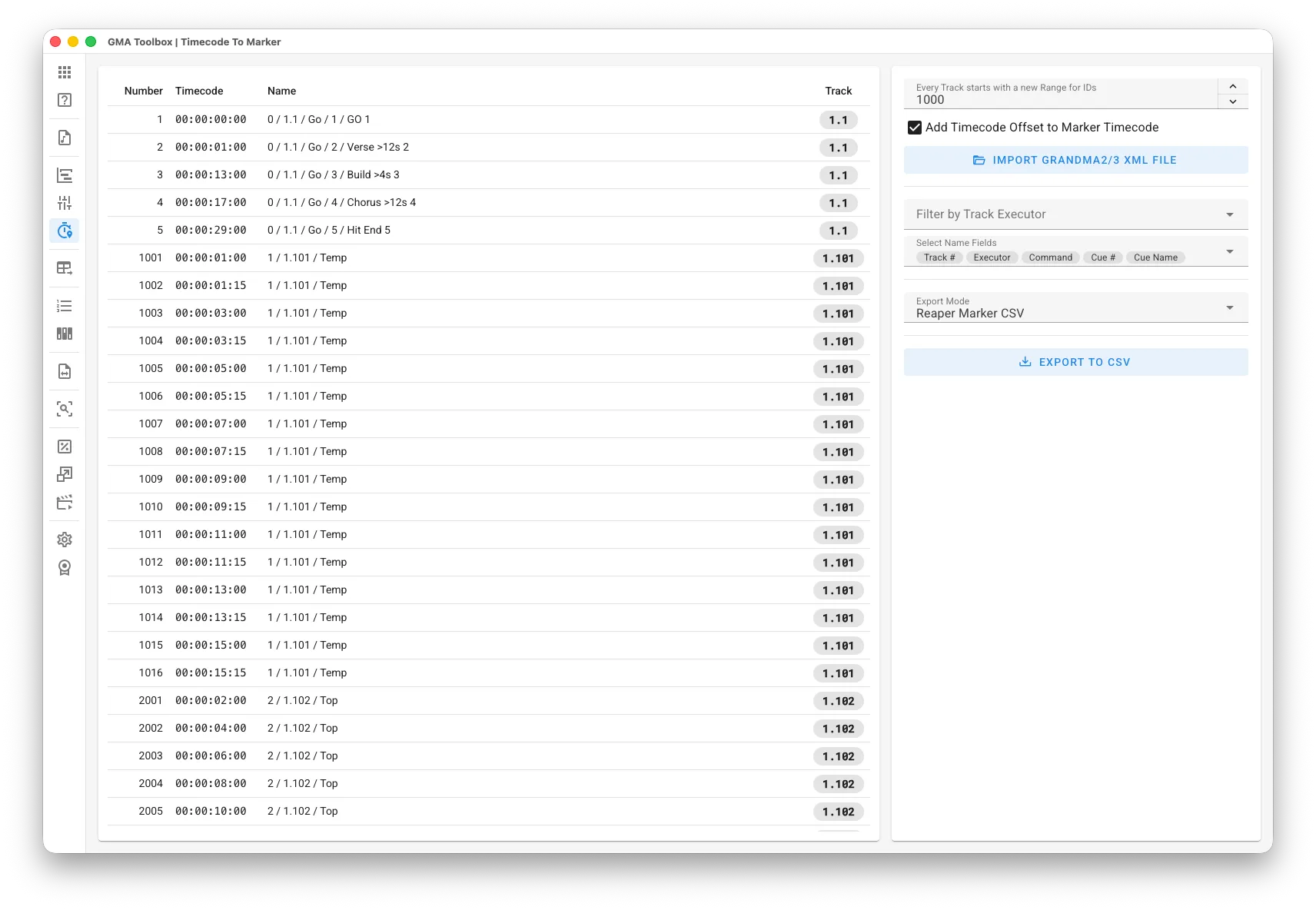
Extract markers from existing grandMA timecode objects and convert them into a format compatible with audio editors like Reaper.
Core Capabilities
Section titled “Core Capabilities”- Convert Values to Fade Move Events
Automate fader movements using predefined value sequences. - Reverse Timecode Conversion
Extract markers from grandMA timecode objects to create a clear reference of cue positions. This feature helps recover timecode data when the original marker file has been lost. - Restore Timecode References
Extract marker information from existing timecoded shows to analyze, adapt, and use as a reference for further synchronization and creative development.
Step-by-Step
Section titled “Step-by-Step”- Export Timecode from Showfile:
- For fast and easy transfer, select a USB drive before exporting.
- Use the “
Export Timecode (number)” command to export the timecode as XML.
- Import Timecode XML:
- Configure your preferred import settings.
- Use Import XML File to import data from the exported grandMA Timecode file (.xml).
- Setup Export Parameters:
- Choose an export mode:
Reaper Marker CSV: Use Reaper-specific CSV format.
Generic CSV: Use a generic CSV format.
- Choose an export mode:
- Export:
- Use Export to CSV to generate your marker file.
- Import the generated file into your target software.
For Reaper users: Go to View > Region/Marker Manager, right-click the list, and select “Import regions/markers…”
User Interface
Section titled “User Interface”Import Options
Section titled “Import Options”- Every Track starts with a new Range for IDs: Assigns a fresh sequence of marker numbers to each track, making them easier to identify.
- Add Timecode Offset to Marker Timecode: Adds the grandMA’s internal timecode offset to each marker position.
Marker Options
Section titled “Marker Options”- Filter by Track Executor: Filter markers based on their track executor.
- Select Name Fields: Choose which fields to include in the marker name.
Destination Configuration
Section titled “Destination Configuration”- Export Mode:
Reaper Marker CSV: Use Reaper-specific CSV format.
Generic CSV: Use a generic CSV format.
Only for Generic CSV Export Mode:
- CSV Field ‘Number’: Defines the target column for the marker number.
- CSV Field ‘Timecode’: Defines the target column for the timecode values.
- CSV Field ‘Name’: Defines the target column for the marker labels.
Table Fields
Section titled “Table Fields”- Number: The sequential marker number.
- Timecode: The marker timecode.
- Name: The generated name for the marker.
This is in the formatTrack / Page.Executor / Command
orTrack / Page.Executor / Command / Cue-ID / Cue-Name Cue-Number - Track: The original track number of the marker.